
In this documentation, we’ll walk through the auto schema of the Swift Rank Schema plugin and explain how each option works. You’ll learn how to configure auto schema to control schema behavior, improve SEO performance, and ensure your structured data is set up correctly across your website.
To add the auto schema to your site, first navigate to Swift Rank → Settings → Auto Schema.
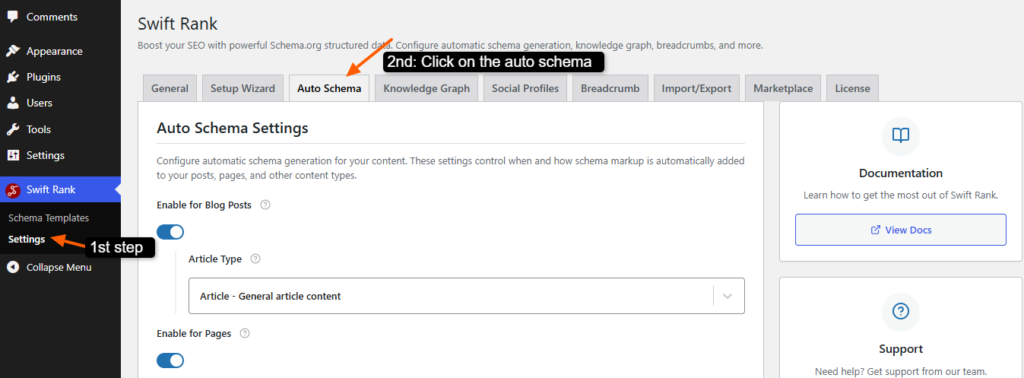
As this section allows you to control how schema markup is automatically generated for different content types such as posts, pages and others.
Enable Schema for Blog Posts #
To enable schema for blog posts, simply turn the Blog Post Schema toggle ON. Once enabled, Swift Rank will automatically add the appropriate schema markup to all blog posts across your website.
After enabling this option, click on the “Article Type” dropdown. From here, choose the schema type that best matches the nature of your blog content. Swift Rank offers multiple article types such as:
- Article – Suitable for general article content and recommended for most blogs.
- BlogPosting – Ideal for informal blog posts and personal content.
- NewsArticle – Best for news-related and current events content.
- ScholarlyArticle – Best for academic or research-based articles.
- TechArticle – Recommended for technical documentation and how-to guides.
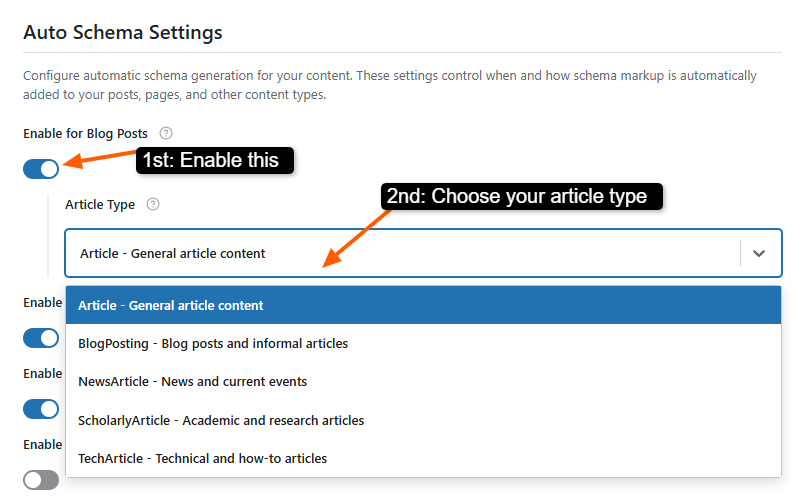
For most standard blogs, choosing BlogPosting or Article is the most suitable option.
Enable for Pages #

You can enable it for pages that apply schema to your regular pages, helping search engines understand the purpose and structure of your non-blog content.
Enable for Search Results #
Enabling schema for search results means adding schema to your site’s internal search results pages.

It helps search engines identify these pages as structured search result listings instead of regular content, allowing them to be interpreted and indexed more accurately.
Enable for WooCommerce Products #
The Enable for WooCommerce Products option in Swift Rank is designed specifically for websites that use the WooCommerce plugin to sell products.

When this option is enabled, Swift Rank will automatically add Product schema markup to all your WooCommerce product pages. This structured data helps search engines clearly understand important product details such as product name, price, availability, ratings, and reviews.
Enable Google Sitelinks Searchbox (PRO) #
The Google Sitelinks Searchbox feature allows visitors to search your website directly from Google’s search results page. When enabled, a search box appears below your site name in branded search results, making it easier for users to find specific content without first visiting your homepage.

This feature improves user experience by reducing navigation steps and helping users reach relevant pages faster. Since this is a PRO feature, upgrading is required to unlock and activate it.
Enable Knowledge Graph Schema #
The Knowledge Graph Schema helps search engines understand the overall identity of your website or brand.

It provides structured information about your business, organization, or personal brand, such as name, logo, website, and social profiles. This schema increases the chances of your website appearing in Google’s Knowledge Panel and improves overall trust and authority signals.
Enable Breadcrumb Schema #
Breadcrumb Schema adds structured data for your site’s navigation hierarchy.

It shows search engines how your pages are connected and where a page sits within your site structure.
For example: Home > Category > Post Name
Auto Image Schema (PRO) #
The Auto Image Schema feature automatically generates ImageObject schema for images used in your content. Swift Rank detects images added through Gutenberg image blocks or IMG HTML tags and creates structured data that includes image dimensions, captions, and alt text.

This automation ensures images are properly optimized for search engines without manual configuration. It improves image visibility in search results and helps Google better understand visual content.
Auto Video Schema (PRO) #
The Auto Video Schema feature automatically creates VideoObject schema for videos embedded in your posts or pages. It supports major platforms such as YouTube, Vimeo, Wistia, and more than 10 other providers, as well as locally hosted videos.

Swift Rank extracts key video details and generates structured data to improve video discoverability in search results. For best SEO performance, it is recommended to use one primary video per page.
Save Changes #
After configuring these options, always click the Save Changes button to apply your settings. This ensures that all selected schema features are correctly implemented across your website.


