
In this documentation, we are going to explore the Test Schema feature available in the Swift Rank plugin. This feature allows you to test and validate the schema markup that has been added to your website.
Step 1: Log in to WordPress as an Administrator #
Ensure you are logged in to your WordPress website with an administrator account and that the Swift Rank plugin is installed and active.
Step 2: Open Your Website’s Main URL #
Visit your website’s main URL (for example, example.com) while logged in. This allows the WordPress Admin Bar to appear at the top of the page.
Step 3: Locate the Test Schema Option #
In the top row of the WordPress Admin Bar, locate the Test Schema menu.
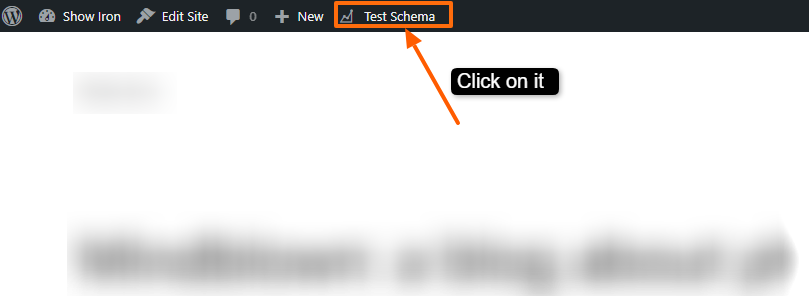
This menu is always visible when viewing the front end of your site and provides quick access to schema testing tools.
Step 4: Click on the Test Schema Menu #
Click on Test Schema to open the dropdown menu. You will see two schema testing options available.
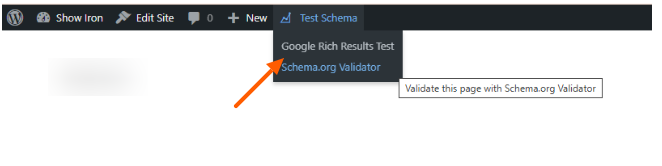
The Test Schema menu provides a quick and convenient way to validate the schema implemented on your site without manually copying URLs or JSON-LD code.
Step 5: Available Schema Testing Options #
The Test Schema menu includes the following two testing options:
1. Google Rich Results Test #
This option allows you to test your page’s schema using Google’s Rich Results testing tool.
It checks whether the structured data added through Swift Rank is eligible for Google rich results and highlights any errors or warnings based on Google’s structured data guidelines.
2. Schema.org Validator #
This option opens the Schema.org Validator, which validates your schema markup against official Schema.org standards.
It ensures that the schema structure, properties, and data types are technically correct and compliant, regardless of search engine–specific requirements.
Step 7: Review and Fix Issues (If Any) #
Review any errors or warnings shown in the testing tools and make the necessary adjustments in your Swift Rank schema settings to improve schema accuracy and performance.
Once you are done with all your changes click on the publish button.


